How to Renew Your Business License Online
Your renewal letter from the City asks you to renew your business license through the City of Dardenne Prairie Community Portal. Renewal deadline: December 30, 2026. Renewals completed after December 31 are subject to the City's late fees. Have ready: a Missouri no-tax-due letter issued within the last 90 days, an email address you can open now, and a credit or debit card for the $25.00 renewal fee.
For: Business License holders
Get your Missouri no-tax-due letter
The Missouri Department of Revenue calls it a Certificate of No Tax Due. Go to dor.mo.gov/taxation/business/filing-payment/no-tax-due, open the Online No Tax Due System, and enter your Missouri Tax Identification Number and PIN. Save the certificate as a PDF, or take a clear photo of the printed copy.
Tip: The letter must be issued within the last 90 days. If your PIN is missing, call the Department of Revenue at 573-751-7200; other questions: 573-751-9268 or taxclearance@dor.mo.gov.
Go to the portal and sign in
Go to communityportal.dardenneprairie.gov and, under Licenses, choose Renew a License. Under For residents, choose Continue with Google, Sign in with email, or Create a resident account (use your business email and type the code the portal emails you).
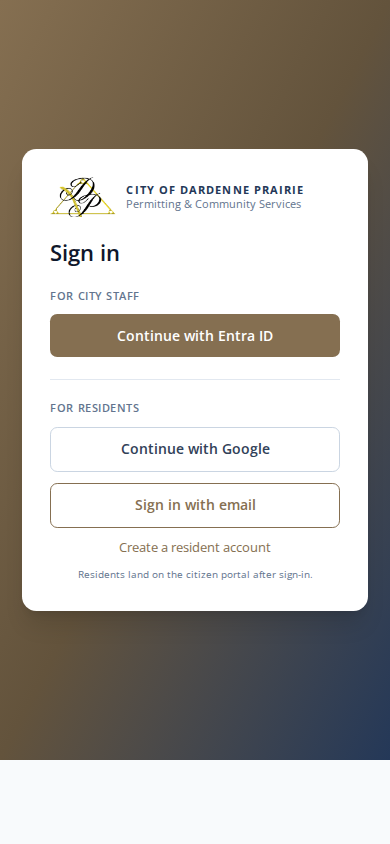
Tip: If it says Invalid code after you confirm your email, just sign in; your account is ready.
Find your license
After you sign in, the portal opens My Licenses, where your business license is listed with its license number. Open your license to see its details. If you do not see it, contact City Hall before you go further.
Start your renewal
On your license page, choose Renew this license. The next page shows the $25.00 renewal fee. Choose Request Renewal.
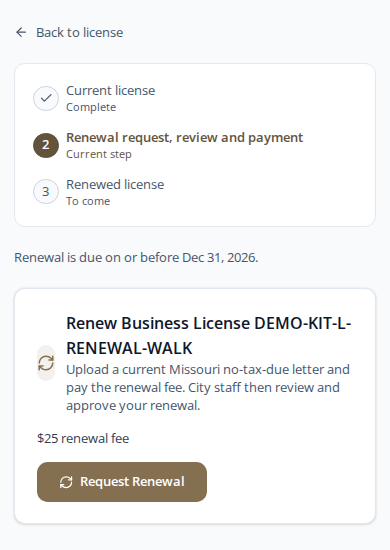
Tip: If your contact name, phone or mailing address changed, update them under My Profile. To change the business name or the address on the license, contact City Hall.
Upload your letter and enter its issue date
Enter the date printed on your letter, upload the letter (PDF, JPG, PNG or Word files up to 25 MB), then choose Save no-tax-due letter. You will see "Your no-tax-due letter is saved."
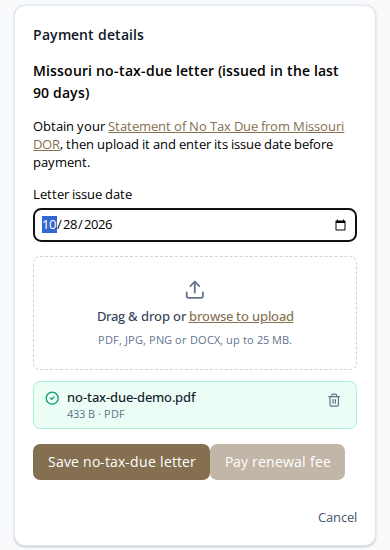
Tip: The portal accepts a letter issued in the last 90 days and not dated in the future. If the date is refused, check it against the letter or get a new letter.
Pay the $25.00 renewal fee by card
Pay the $25.00 renewal fee by card. A card convenience fee is added and shown as its own line before you pay. Once the letter is saved, choose the Pay button showing your total. Enter your card details in the secure card form (card payments are processed by Stripe), then choose the Pay button showing your total to finish. Your card's bank may ask you to confirm the payment.
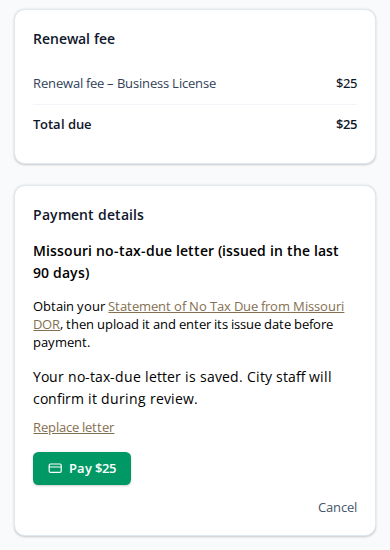
Tip: If you renew after December 31, the page also shows the late fee owed, and the total includes it.
Awaiting City review
After payment you will see Awaiting City review. City staff will review your no-tax-due letter before issuing your renewed license and certificate. You will also receive an email saying your renewal has been received, and you can choose View receipt to see or print your receipt.
What happens next
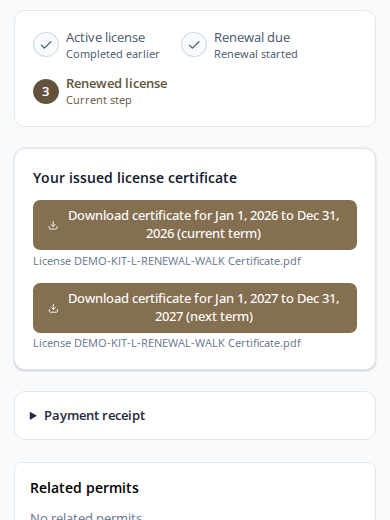
When the City approves your renewal, you receive an email. Sign in, open your license under My Licenses, and choose Download license certificate. If the City needs something else, the email gives the reason: sign in, choose Upload documents, enter the issue date, upload the replacement letter, then choose Save no-tax-due letter and Send renewal back to the City. You do not pay again.
Need help?
For renewals and the portal, contact City Hall: Debbie Ryan, City Clerk, 636-755-5353, debbie.ryan@dardenneprairie.gov, 2032 Hanley Road, Dardenne Prairie, MO 63368. If your business has closed, relocated, changed ownership, or no longer operates within the City limits, please contact City Hall.